

Introduction
In Part 1, we covered how to enable and connect to the RESTCONF server on an Arrcus device — the basics of URI structure, HTTP methods, authentication, and a first successful GET. In Part 2 we go one level deeper: understanding what you are actually querying. To use RESTCONF effectively you need a working mental model of the YANG data tree underneath it. By the end of this post you will be able to find the correct RESTCONF path for any ArcOS feature on your own.
Three Kinds of YANG Modules in ArcOS
When you query the device you will encounter three categories of module name in the responses.
1. OpenConfig modules
OpenConfig is a vendor-neutral, community-driven set of YANG models covering most common networking features: interfaces, BGP, ISIS, OSPF, VLANs, QoS, and more. ArcOS uses OpenConfig as its primary data model. This means the top-level containers and the bulk of the configuration and state data are accessed using OpenConfig module names.
Examples: openconfig-interfaces, openconfig-system, openconfig-network-instance, openconfig-bgp
2. Arrcus augmentation modules
Where the OpenConfig model exists but does not cover an Arrcus-specific capability, ArcOS augments the OpenConfig tree with additional nodes. These fields appear inline in the JSON response alongside the standard OpenConfig fields, prefixed with the augmenting module name.
You will recognise them by the prefix pattern: arcos-openconfig-<feature>-augments:<field>
For example, the standard OpenConfig state/counters block for an interface is extended with Arrcus-specific counters:

You do not need to do anything special to retrieve augmented fields — they come back automatically in the same GET response as the base OpenConfig data.
3. Vendor-specific (native ArcOS) modules
For features that have no OpenConfig equivalent at all, ArcOS provides its own native YANG modules. These are accessed using the arcos-<feature>: prefix directly as the top-level module in the URI.
Example: arcos-system-information, arcos-license, arcos-version
The practical rule: try an OpenConfig path first. If the feature has no OpenConfig model, look for an arcos-* module in the YANG library.
The config and state Container Pattern
This is the most important structural pattern in OpenConfig and the one that trips up newcomers most often.
Almost every OpenConfig node has two parallel containers:
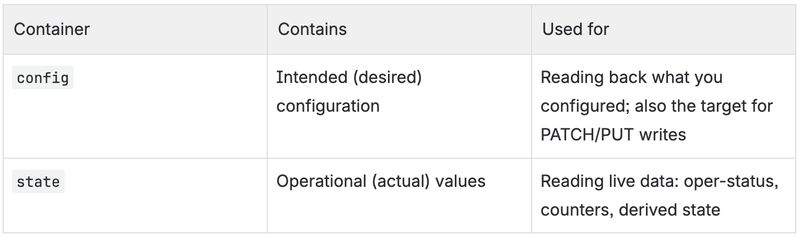
The state container typically includes everything in config plus operational-only fields such as counters, timestamps, oper-status, and negotiated values. When monitoring a network you almost always want state. When making changes you target config (or the parent container directly).
Example — interface config vs state:

Addressing List Elements
Many YANG containers are lists — tables of entries identified by a key. In RESTCONF, you address a specific list entry by appending =<key-value> to the list name.

Composite keys
Some lists have more than one key leaf. In RESTCONF, composite key values are separated by commas, in the order the keys are declared in the YANG model.
A common example is the protocol list inside openconfig-network-instance. Its YANG definition has two keys:
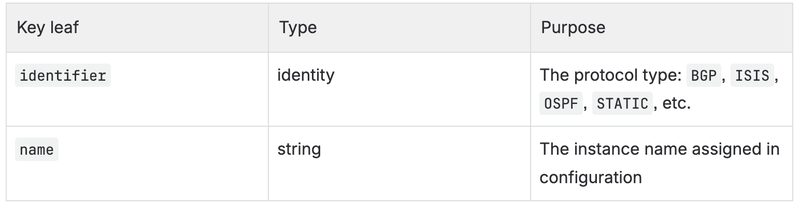
So to address the BGP instance on ArcOS:

The two values happen to be identical here because ArcOS uses BGP as the default name for the BGP protocol instance. If you had named the instance differently — say my-bgp — the key would be protocol=BGP,my-bgp.
The full path to reach BGP state in the default network instance is therefore:

Discovering Paths: Using the YANG Library
The device publishes a complete inventory of every YANG module it implements. This is your starting point whenever you need to find a path you have not used before.
Step 1 — Find the module and its schema URL

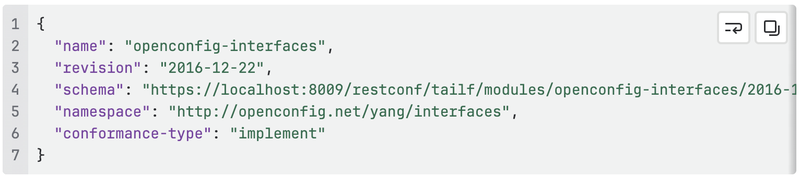
Each entry in the response includes the module name, its revision date, and — crucially — a ready-to-use schema URL:
Step 2 — Fetch the YANG schema
Copy the schema URL from the response above and use it directly — there is no need to construct it manually. Replace localhost with your device's management IP:

The YANG source tells you the exact container names, list keys, leaf names, and types — everything you need to construct a valid URI.
Step 3 — Explore with ?depth
Start with a shallow read to understand the structure before going deep:

Increase depth until you can see what you need. Omitting depth returns the full subtree, which can be very large.
Worked Examples
All examples below were verified against a live ArcOS 8.3.1A.P2 device.
Example 1: ArcOS software version (vendor-specific module)
This is a good first query to verify which ArcOS release is running. There is no OpenConfig equivalent, so this uses a native Arrcus module.

Response:

CLI equivalent: show version
Example 2: System state (OpenConfig)
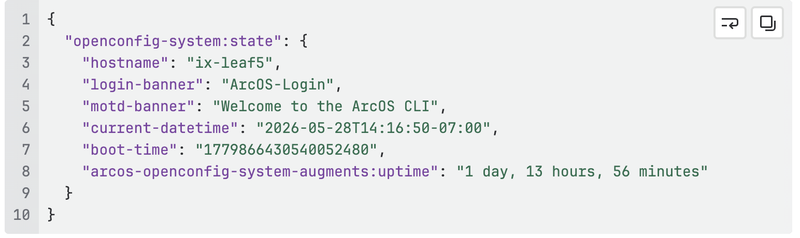
Hostname, uptime, and current date/time. The arcos-openconfig-system-augments:uptime field is an Arrcus augmentation — it appears inline alongside the standard OpenConfig fields.

Response:
CLI equivalent: show system state
Example 3: Interface status summary using ?fields (OpenConfig)
Retrieving all interfaces at full depth returns a lot of data. The ?fields query parameter lets you select exactly the leaves you need. This example fetches only the name and up/down status for every interface — the equivalent of show interface brief.

Response (trimmed):
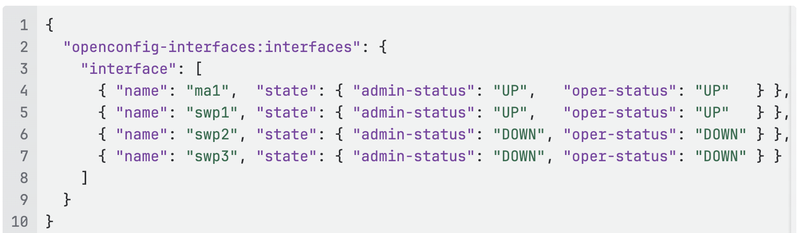
The ?fields syntax uses semicolons to separate siblings and parentheses to descend: fields=interface(name;state(admin-status;oper-status)).
CLI equivalent: show interface
Example 4: Single interface — full state detail (OpenConfig + augmentations)
Drill into a specific interface by using the list key syntax interface=<name>. This returns the complete operational state including Arrcus-specific counters, FEC statistics, and rate information.

Response (trimmed to highlight the structure):
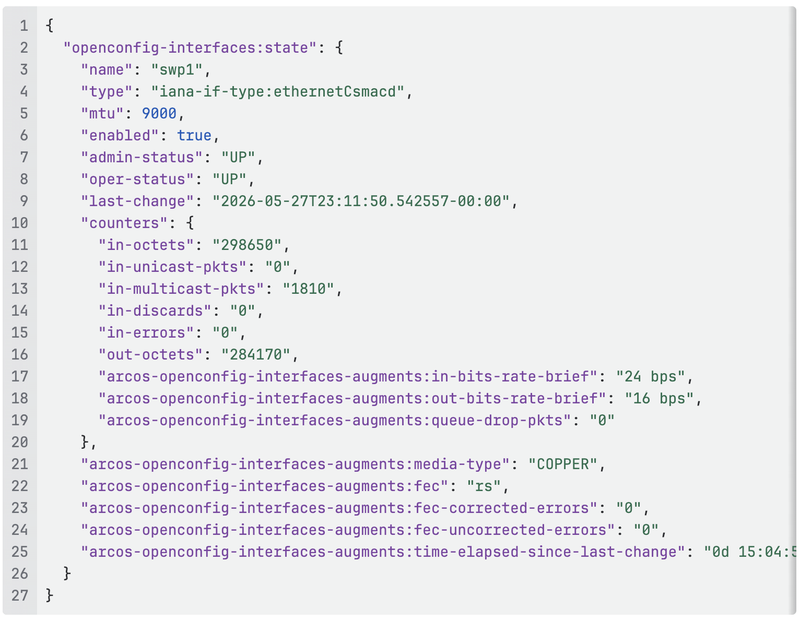
Notice that arcos-openconfig-interfaces-augments:* fields sit alongside standard OpenConfig fields seamlessly in the same JSON object. There is no separate request needed to get augmented data.
CLI equivalent: show interface swp1
Query Parameters Cheat Sheet
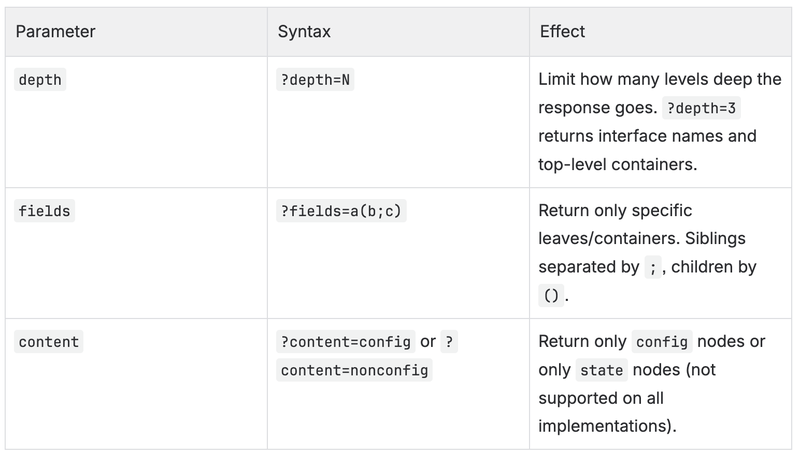
How to Find Any Path on Your Own
The process is always the same:
- Start with the YANG library to identify which module covers the feature:
GET /restconf/data/ietf-yang-library:modules-state - Copy the
schemaURL from that module's entry and fetch the YANG source to understand container names, list keys, and leaf types. - Explore with
?depth=3or?depth=4to see the live shape of the data on the device. - Narrow down with
?fieldsor by appending sub-paths once you know the structure. - Check whether the field is in
configorstatedepending on whether you want configured intent or live operational values.
What's Next
In Part 3 we will move from reading to writing — making configuration changes using PATCH, PUT, POST, and DELETE, with real examples covering interface configuration, hostname changes, and managing static routes. We will also cover how to handle errors and verify that a change took effect.
References
- Part 1 — Introduction to RESTCONF on Arrcus devices
- OpenConfig Working Group
- RFC 8040 — RESTCONF Protocol
- RFC 7950 — The YANG 1.1 Data Modeling Language
- ArcOS CLI Guide v8.1.2 — System Level Configuration Guide → RESTCONF