

Introduction
The RESTCONF on ArcOS series showed how to read and write ArcOS configuration over HTTP, using OpenConfig YANG models. NETCONF manages exactly the same YANG data models — the same containers, the same leaves, the same namespaces — but the transport, encoding, and edit workflow are different enough to deserve their own walkthrough. This post is the NETCONF counterpart to RESTCONF Part 3: setting an interface description, changing the hostname, and adding/removing a static route — this time over an SSH-based NETCONF session using XML instead of curl and JSON. Every example in this post was verified against a live ArcOS device.
How NETCONF Differs From RESTCONF on ArcOS
Before the examples, three structural differences matter more here than they did for RESTCONF:
- Candidate datastore, not direct-to-running. ArcOS's NETCONF server does not advertise the
:writable-runningcapability, so you cannot editrunningdirectly the way a RESTCONF PATCH does. Every<edit-config>targetscandidate, and the change has no effect until you send an explicit<commit/>. Forgetting the commit is the single most common mistake — your edit-config will return<ok/>, but nothing changes on the device until you commit. - Locking is expected. Because
candidateis a shared, session-independent datastore, good practice is to<lock target="candidate"/>before editing and<unlock/>afterward, so two NETCONF sessions cannot interleave incompatible changes. - XML, not JSON — and no URL to encode. RESTCONF addresses a resource with a URL path (
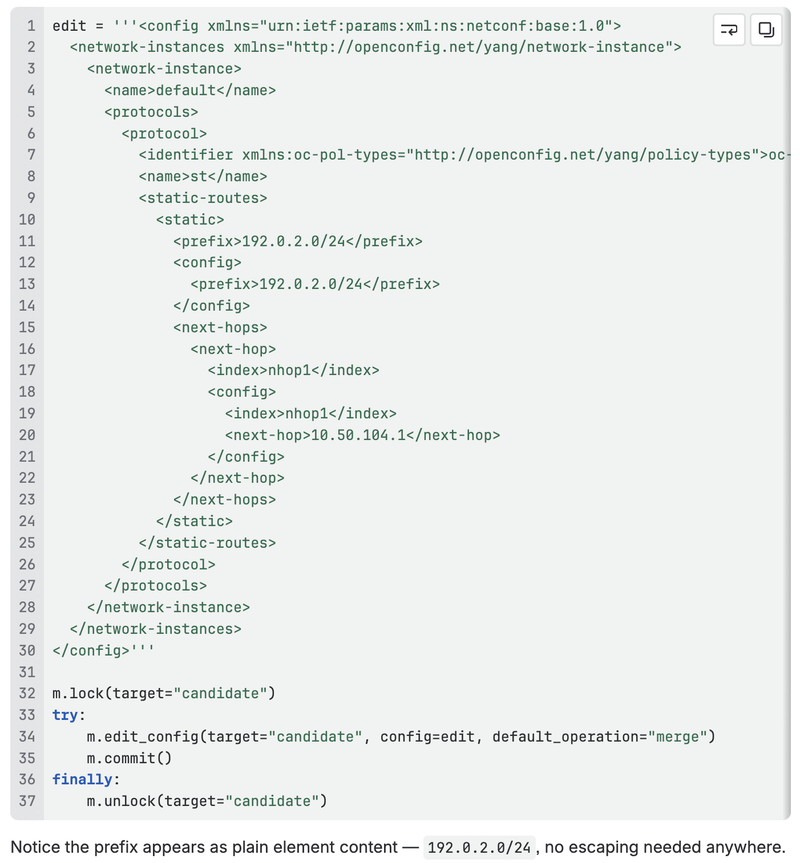
interface=swp1/config), which is why the/in an IP prefix had to be percent-encoded as%2F. NETCONF has no such encoding step:<prefix>192.0.2.0/24</prefix>is just element content, and XML never confuses it with markup.
Prerequisites

ncclient is a Python NETCONF client; the examples in this post use it directly from a Python REPL to keep the XML payloads visible, exactly the way Part 3 used raw curl to keep the JSON payloads visible. (Part 2 of this series moves to a reusable library, the same way RESTCONF Part 4 did.)
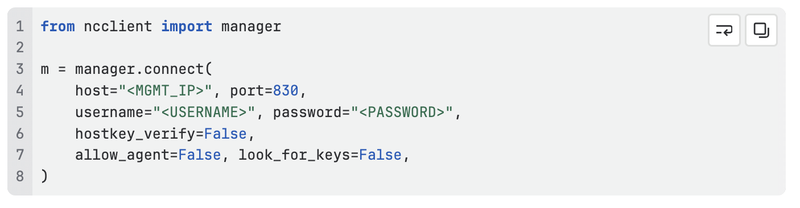
Discovering what a device actually supports. The moment this connection is established, ArcOS advertises every YANG module it supports — name, revision, and any deviations — in the <hello> capabilities exchange (m.server_capabilities after connect(); well over a hundred entries on a typical ArcOS device). Rather than paging through that list by hand, the in-house nctool CLI (pip install netconf-yang-tools) connects as a NETCONF client and can list or download every YANG module a device advertises in one step — handy for keeping a local schema cache in sync with what a specific device actually runs, instead of working from documentation that may be a version behind.
Rule 1: Read Before You Write
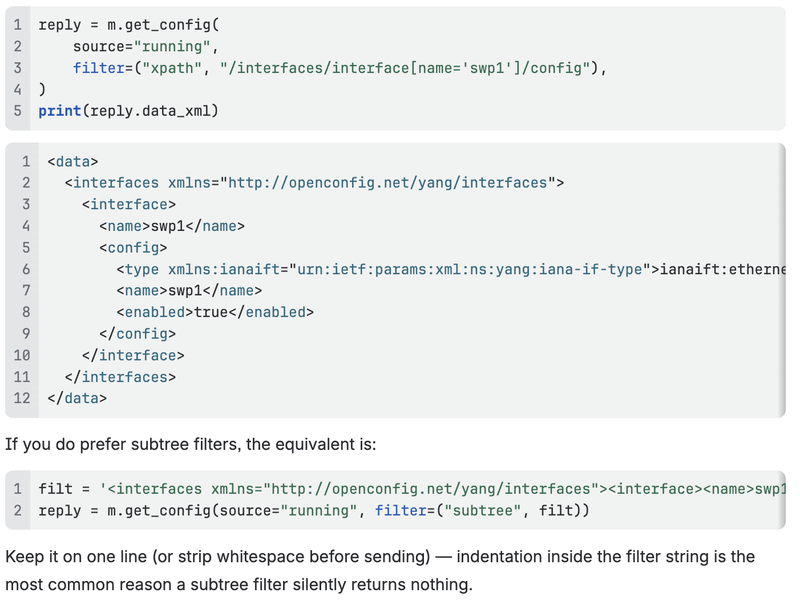
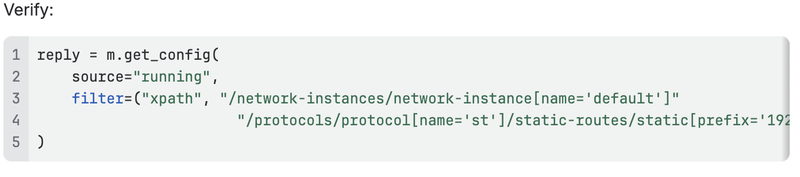
Just like RESTCONF, fetch the current state before you edit it. NETCONF's read operation is get-config, and it takes a filter rather than a URL path.
Filtering: prefer xpath over subtree
NETCONF supports two filter styles. Subtree filters are the RFC 6241 standard and work well — but they are whitespace-sensitive in some client/server combinations; an indented, multi-line filter string can silently match nothing where a compact one-line version works. XPath filters (available because ArcOS advertises the :xpath:1.0 capability) sidestep that entirely and read closer to a RESTCONF path, so this post uses xpath throughout:
edit-config: The NETCONF Equivalent of PATCH
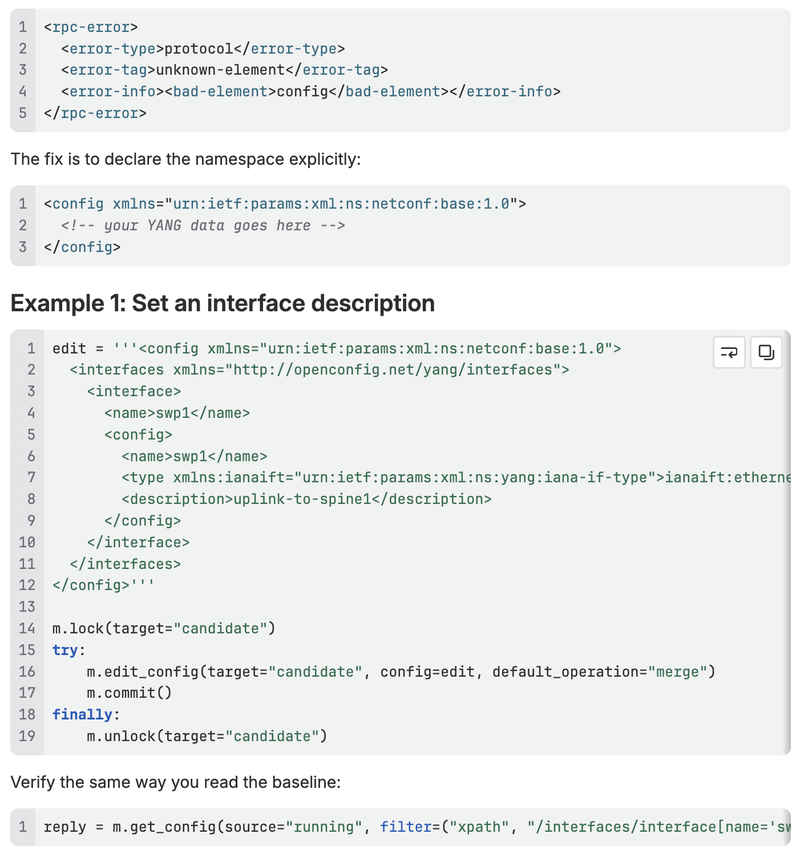
edit-config with default-operation="merge" (the default) behaves like RESTCONF's PATCH — only the elements you include are changed, everything else is left alone. The difference is where the change lands: it's applied to candidate, and only takes effect once committed.
The <config> wrapper must declare the NETCONF namespace
This is the single most common way a hand-written edit-config payload fails. The payload passed to edit_config() must be rooted in an element literally named config — but if you don't explicitly declare the NETCONF base namespace on it, it resolves to no namespace at all (its sibling elements like <target> are namespace-qualified via the client's own nc: prefix, but your bare <config> isn't), and a strict server rejects it:
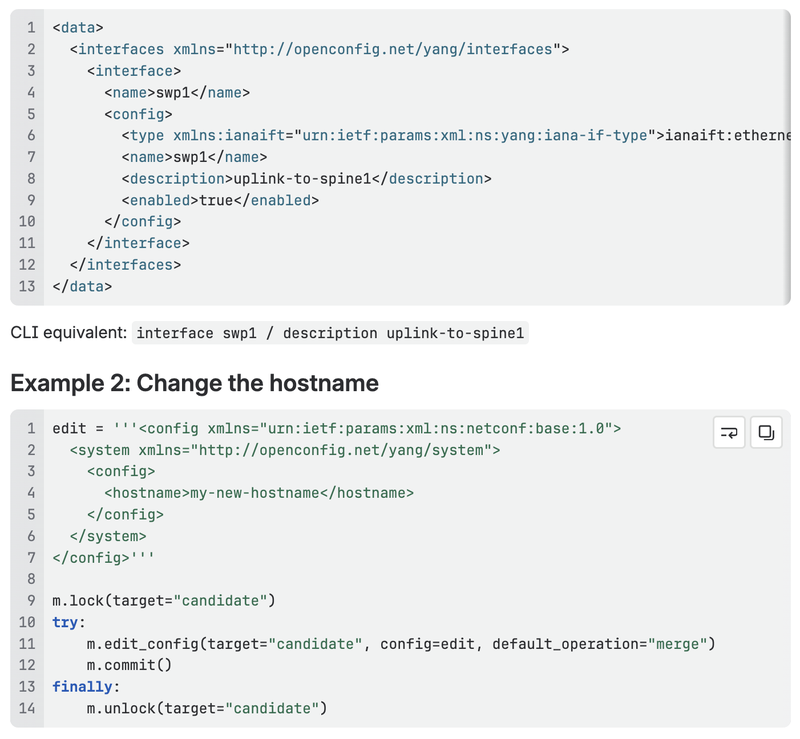
Because merge is the default operation, login-banner and any other existing leaves under system/config are left untouched — same guarantee RESTCONF's PATCH gives you.
CLI equivalent: system hostname my-new-hostname
edit-config: Creating a New List Entry
Adding a static route works the same way as RESTCONF Part 3 — discover the protocol instance name first, then merge in the new list entry.
Finding the static route path

Look for the entry whose identifier is oc-pol-types:STATIC — its name is the instance name you need (on many ArcOS deployments this is st, not STATIC; never assume, always check).
Add the static route
Removing Configuration
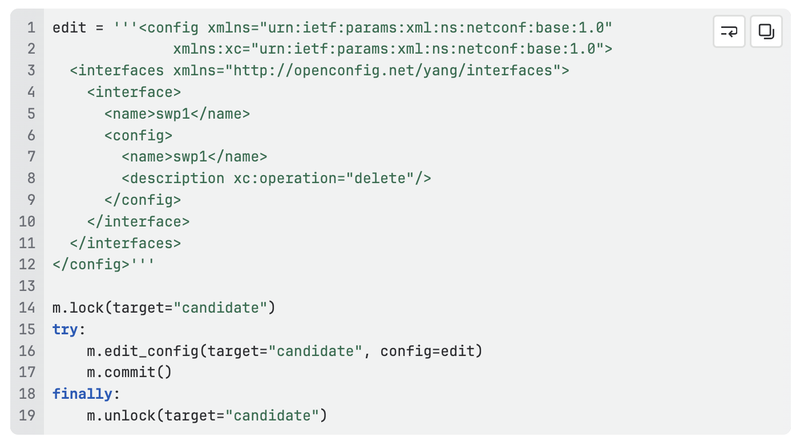
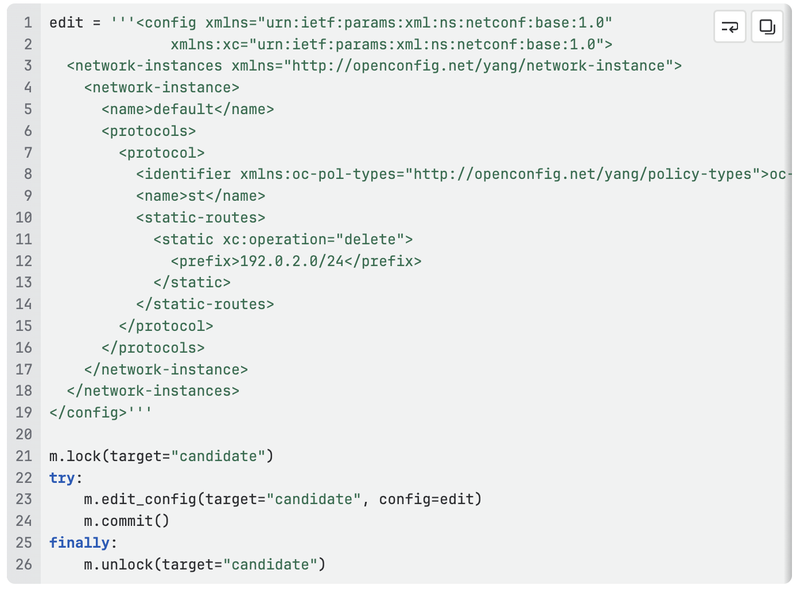
Deletion in NETCONF isn't a separate HTTP verb — it's the same edit-config, but with xc:operation="delete" on the element you want removed. You must declare the xc namespace prefix in addition to the default one on <config>.
Remove a single leaf
Remove an entire list entry
Put xc:operation="delete" on the list entry itself, with just enough content to identify it by its key:
Understanding Errors — and a Key RESTCONF Difference
This is the part where NETCONF and RESTCONF diverge in a way that can catch you off guard.
A get-config filter that matches nothing is not an error. RESTCONF returns HTTP 404 with an ietf-restconf:errors body when you GET a path that doesn't exist. NETCONF's get/get-config filters are selection filters, not path lookups — if nothing matches, you simply get back an empty <data/> element, with no error of any kind:

If your script checks "did this call return an error?" to decide whether a resource exists, that check works for RESTCONF but silently does nothing useful in NETCONF — you have to check whether the returned data is empty instead.
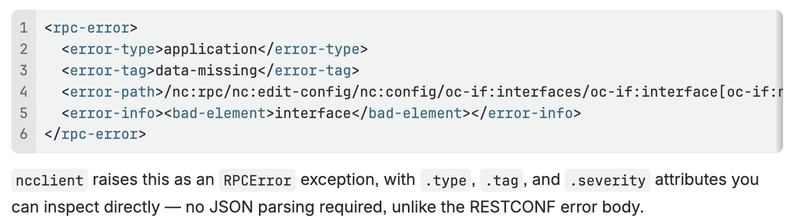
Where NETCONF does raise an error is an operation that requires the data to already exist and it doesn't — for example, deleting a list entry that isn't there:
Workflow Summary
For any configuration change over NETCONF:
- Lock the candidate datastore
- get-config the target resource (prefer an xpath filter) to read current state and confirm the correct path
- edit-config against
candidatewith only the elements you want to change — remember the explicit NETCONF namespace on<config> - commit — nothing takes effect until you do
- Unlock
- get-config again to verify the change landed in
running
What's Next
In Part 2 we replace these hand-written XML payloads with a small ncclient-based Python library — the NETCONF counterpart to RESTCONF Part 4's requests-based one — that handles locking, committing, and error handling for you.
References
- RESTCONF on ArcOS, Part 3 — Making Configuration Changes
- RESTCONF on ArcOS, Part 4 — Scripting with Python
- ncclient documentation
- RFC 6241 — NETCONF Configuration Protocol
- OpenConfig Working Group
netconf-yang-tools(nctool) —pip install netconf-yang-tools, for listing and downloading all YANG modules a device advertises- ArcOS CLI Guide v8.1.2 — System Level Configuration Guide → NETCONF